
“I have two setters, but leads keep falling through.”
Maya’s own wordsThe Company Brain · Connected context
Know what happened.
Know what to say next.
The conversation. The resource they clicked. The note your setter left. Orren brings the pieces together, so your next move starts with the whole story.
Team walkthroughSent by Jordan

Maya ChenOne lead. A connected story.
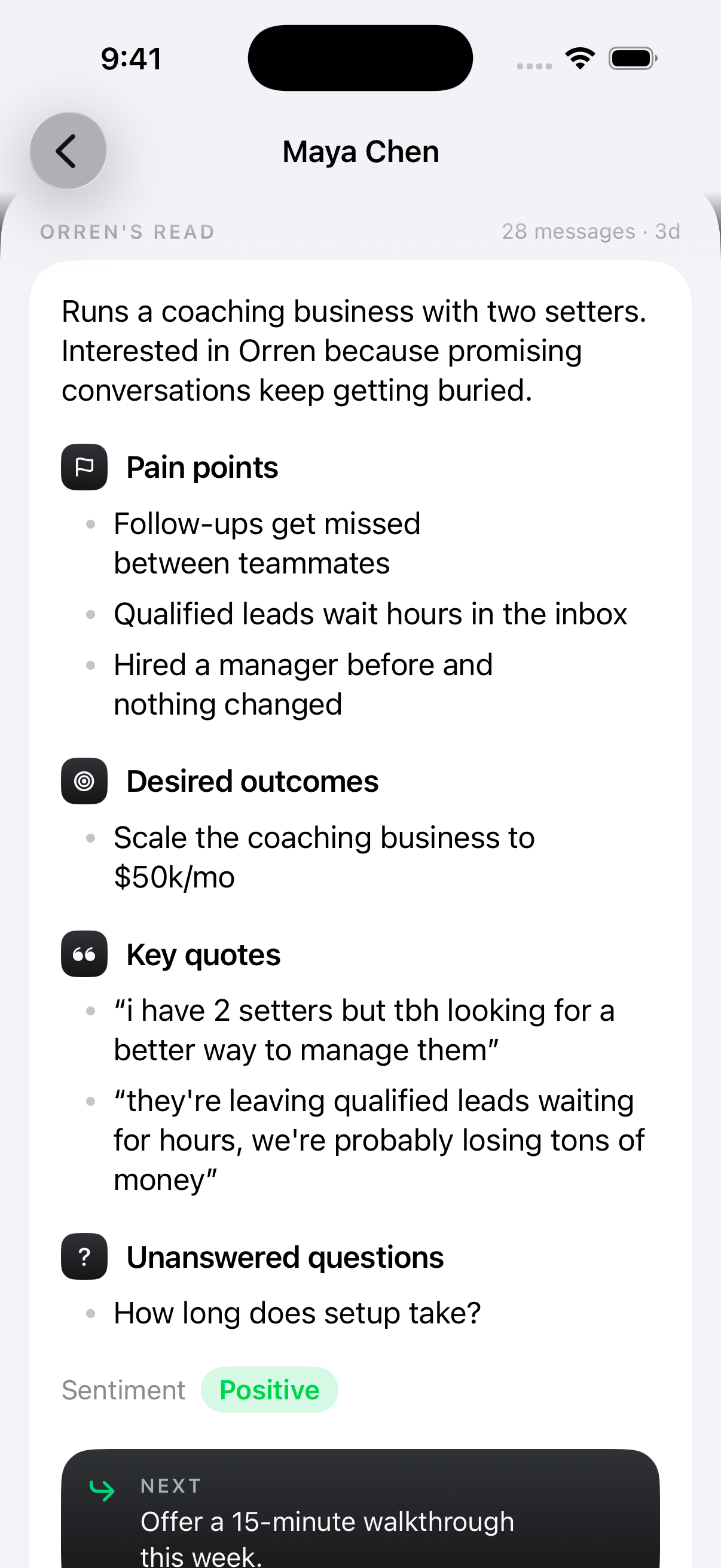
 Orren’s read
Interested in the offer.
Unsure about the setup.
She wants a better process for her two setters. Show her how they would work together.
Suggested next stepOffer a team walkthrough
Budget confirmed. Show her how the handoff works.
J Jordan · SetterPart of the offer.
Relevant to her concern.
Illustrative lead and activity. Suggestions use available context and remain yours to review.
The latest message
is only part of the story.
A lead asks, “How does setup work?” The useful answer depends on what came before. Orren connects that history to the person asking.
What you see now
“How does
setup work?”
- What she told you
Her team misses follow-ups.
She needs a process her two setters can actually use.
- What you shared
A walkthrough of the team workspace.
Jordan sent the resource. A click is recorded against Maya.
- What your teammate added
The budget is there. Setup is the question.
The note gives the next person a place to pick up.
Context that moves with the lead
A new teammate.
The same understanding.
Your closer should know more than a name and a booking time. Bring the lead’s pain points, desired outcomes, questions and team notes into the handoff.
Alex can pick up where Jordan left off, with a clearer idea of what matters to Maya before the call starts.
J
See how your team works together Jordan · SetterContext included
→ARAlex · CloserReady to pick up
See the signals.
Keep their meaning clear.
The message, the click and the payment tell you different things. Keeping them connected helps you see the journey without guessing what happened.
From the conversation
What they say.
Questions and objections help explain what a lead needs before taking the next step.
Resource link clicked
What they open.
Personal tracked links tie a click to a lead and the teammate who sent the resource.
A click does not mean they watched the whole video.Matched payment confirmed
What happened next.
Connected payment records bring the sale back to the lead and the activity that came before it.
The recorded path does not prove what caused the sale.Useful before the reply.
Useful beyond it.
Follow the same lead through three moments where a little more context changes how your team approaches the work.
A more relevant next message
Answer the concern behind the question.
Maya wants to know how setup works. Her earlier messages explain why: she has two setters, and follow-ups keep slipping between them.
- Conversation: follow-ups get missed
- Team note: two setters
- Your offer: guided team setup
 Context in practice
Want me to show you how your two setters would use it? We can walk through setup together.
An example reply to reviewA closer who starts with context
Continue the conversation. Skip the recap.
Jordan has confirmed Maya’s budget. Alex can review her concerns, the resource already shared and the team’s notes before taking the call.
- Budget: confirmed in the conversation
- Resource: team walkthrough shared
- Team note: show the handoff process
Context in practiceMaya wants a clearer handoff between her setters. Walk through that first, then answer her setup questions.
An example of how your team can use the contextA connected record of the outcome
See the path that came before the payment.
When a confirmed payment is matched to Maya, it belongs with her conversation and the recorded activity that came before it.
- Jordan: resource sent
- Maya: tracked link clicked
- Matched payment: confirmed
Context in practiceReview the conversation, the people involved and the resources clicked alongside the recorded sale.
An example of how your team can use the contextIllustrative journey, not customer results. Available details depend on the records connected to the lead.
Part of the Company Brain
Their story.
Your business behind it.
A lead’s concern is only half the picture. Your offer, your voice and your team’s experience give Orren the business context to help prepare a relevant next step.
Explore the Company BrainStart the next conversation
with the context it deserves.
Start 7-day trial Every feature included. 7-day trial. Card required.
A few things worth knowing
Good questions.
Clear answers.
What connects. What it tells you. What stays in your control.
Something more specific?
Ask us directlyAbout connected context
What does connected context mean?
It means Orren can bring related records together: a lead’s conversation, their profile and tags, team notes, tracked link activity and matched payments. It also draws on the business knowledge available, so a suggestion can reflect both the person and your offer.
How is this different from a lead profile?
The profile gives you a place to understand a person. Connected context is how Orren relates the records behind that profile to your business and the next step. The two work together: you can review the lead, while Orren uses relevant available context to help you respond.
Does a clicked resource mean a lead watched or read it?
No. A recorded click means the tracked link was opened. It does not prove that someone finished a video, read a document or decided to buy. Supported website events can add more information when you configure Orren Pixel on your own site.
Can my closer see what happened before the handoff?
For leads they have access to, teammates can review the conversation, lead details and internal notes. That includes the context your setter has recorded, so a handoff can carry the lead’s concerns and next steps with it.
How are payments connected to a lead?
Connected payment processors provide payment records. Orren uses available customer information, such as a matching checkout email, to associate payments with known leads. Matching depends on the information available; an unmatched payment is not proof that a specific lead bought.
Does everyone on the team see everything?
No. Access depends on the person’s role and the leads they can access. Personal conversations you hide from the team stay out of their shared inbox. Connected context does not mean giving every teammate the owner’s full business view.
What if some information is missing?
Orren can only draw on information that has been connected, recorded and processed. A missing click is not proof of no interest, and a suggested next step is something to review. Your team can add notes and correct the details as the conversation develops.