Seen. Without opening it.
Their photo appears in the corner when they’ve read your latest message. One glance, and you know.
Your Instagram sales inbox, built for Mac. See who needs a reply, understand what they need, and keep the conversation moving.
7 days. Your selected plan. Card required.
Who’s seen it. Who’s waiting. Who’s ready for the next step.
The little signals that make a busy inbox feel manageable.
Their photo appears in the corner when they’ve read your latest message. One glance, and you know.
The green ring shrinks with the standard 24-hour window. Their next DM resets it. Your reply doesn’t.
Orren adds AI tags for intent, objections and buying signals. The useful details come to the surface.
Filter by reply status or a tag to find the people you want to focus on. Try it here.

Could you walk me through it?
 Budget confirmed
You: Here’s the walkthrough.
Budget confirmedWould this work with my team?
 Warm
Showing all 3 conversations
Follow-up markers and the Gone quiet view bring conversations back into focus, so your team knows where to pick up.
Illustrative inbox examples. Your conversations, signals and timing will vary.
Create a tag for what matters in your business. Apply it to a real conversation, and Orren can learn what it means and look for other leads that fit.
Then filter your inbox by that tag. Find the people with budget, an objection to answer, or a teammate who needs to be part of the decision.
You stay in control. Review, add or remove tags as the conversation changes.
 Team buy-in
“I’d like my setter to try it before we decide.”
“Can my closer join the walkthrough too?”
Team buy-inUnsolicited pitches and spam shouldn’t compete with a potential client. Orren detects common spam patterns and filters those messages out of the way.
You can see why a conversation was flagged and correct it. A quieter inbox, with you still in control.
Buy followers. Grow your account.
Flagged as spamYour account will be disabled. Click here.
Flagged as spamThe conversations you came here for.
A setter is assigned at the first real contact, whether the lead messages you or your team reaches out. A closer is assigned when a call is booked.
Split leads evenly or give a teammate a larger share. When it’s time to hand off, the conversation and its history stay together.
 New conversationsShared automatically
Example distribution. You choose the balance.
Their words. Their concerns. Your team’s context.
A better reply starts with the whole conversation.
 orrenInside the conversationOrren for Mac
 Warm
All the ways a conversation happens.
One place to keep it moving.
A voice note that says it better. A photo that makes it click. Keep photos, voice notes, posts and reels right in the conversation.
Search a conversation, catch an unread message or revisit your archive. Read receipts and the reply window help you see where things stand.

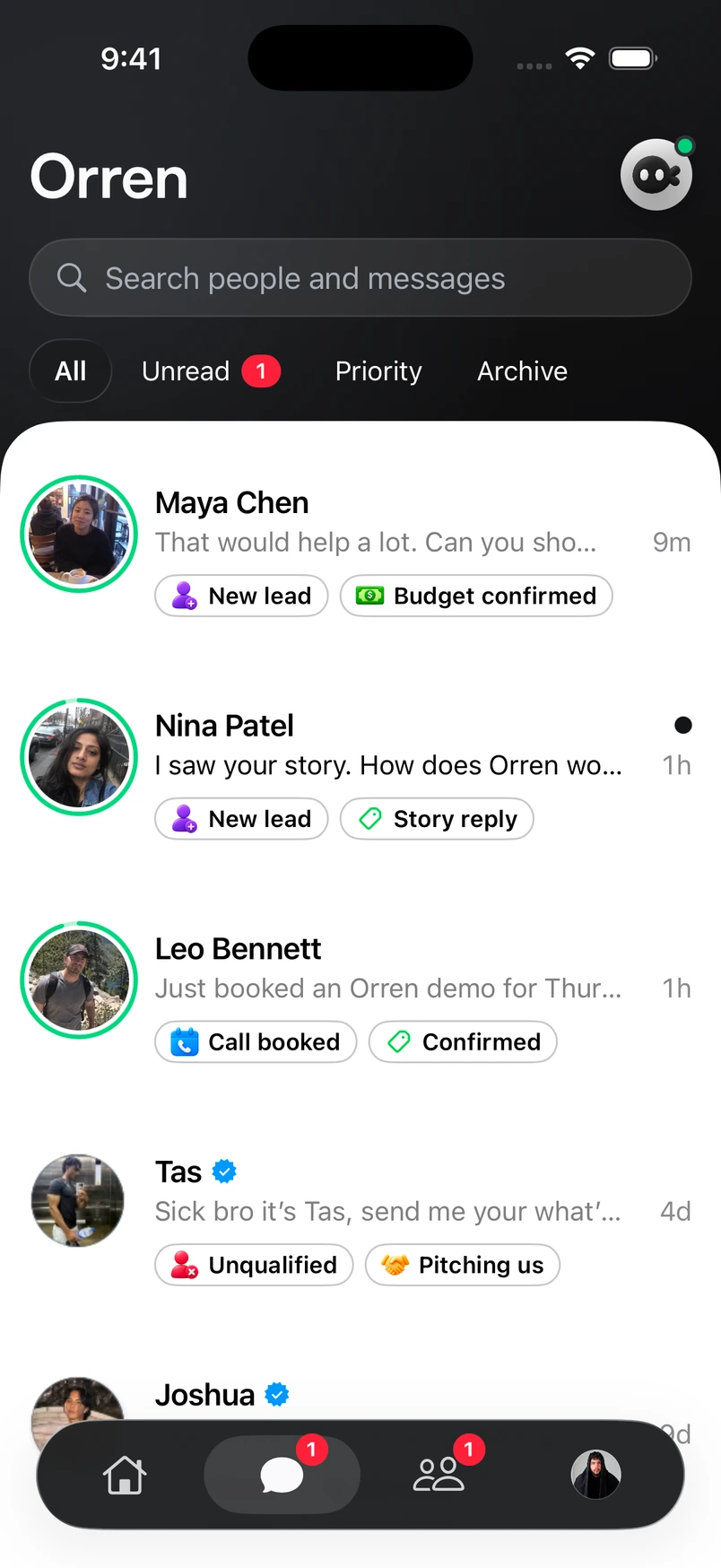
Leave your desk with the whole conversation. Your inbox, lead context and team come with you on iPhone.
Explore Orren for iPhoneChoose your plan. Start with a 7-day trial. Card required.
From AI tags to team handoffs. A closer look at your Instagram inbox in Orren.
Something more specific?
Ask us directlyOrren brings your Instagram conversations into a workspace built for sales. Read and reply there, with tags, lead context and team ownership alongside the conversation.
The green ring around a lead’s photo shows how much of the standard 24-hour reply window remains after their latest incoming message. The arc gets smaller as time passes, while the time label shows what remains. A new message from the lead resets that window; a message from your team does not. Use Needs reply to distinguish unanswered messages from conversations you’ve already replied to.
Yes. Add labels that fit your business. Orren can learn what those labels mean from the conversations you tag, then find other leads that fit.
Yes. Configure how leads are distributed between your setters and closers, including weighted shares. Your team can also assign and hand off individual conversations.
Yes. The iPhone app brings your conversations, lead profiles, timeline and team with you. It is available through the public TestFlight beta. No individual invitation is needed.
Yes. Every plan includes Orren’s features. Choose the capacity your business needs for conversations and team members. The free trial lasts seven days and requires a card.
We use optional PostHog analytics cookies to understand how our website is used and make it better. You can accept or reject these cookies and change your choice anytime. Privacy policy
Your browser’s privacy signal is on. Optional analytics cookies stay off.