Turn comments and story replies into conversations.
Automatically respond to comments, story replies and DM keywords. Build the flow, then choose whether Orren continues the conversation or your setter takes over.
↳ Instagram comment“Send me the GUIDE”Keyword matches guide
→
↗ Opening DMGive interest a next step.Ask Nina to reply for the guide.
Nina replies. Send her the guide.
Then, choose who continues.
Your flow. Your choice. Try either path.
Nina PatelInstagram conversation
From your “GUIDE” comment flow
Hey Nina! Want the guide to keeping up with your leads?
Yes, please!
↗Your follow-up guideResource shared
Orren is handling the conversation
Are you managing your DMs yourself, or sharing them with a team?
Continues using your business context.
An illustrated look at a flow you can build in Orren for Mac.
They show interest. You’re ready to respond.
A comment on your reel. A reply to your story. A word in your DMs. Give each opening a useful next step, without sending every first message yourself.
THE FOLLOW-UP GUIDEGood conversations deserve a next step.Comment GUIDE for a copy. ↗
Nina PatelGUIDE please!♡
A comment becomes a DM.
Choose a keyword on a post or reel. Send an opening message to the person who asked.
A little more clarity. A better follow-up.
Replied to your storyHow does this work?↗
A story starts the conversation.
Respond to a story reply or thank someone who mentions you. Keep the interest moving.
Can you send me the details?
Keyword matched details
Of course. What would you like help with?
A word opens the right flow.
Match the words people send in a DM to the information or resource they’re looking for.
Illustrative examples. You choose the words and messages.
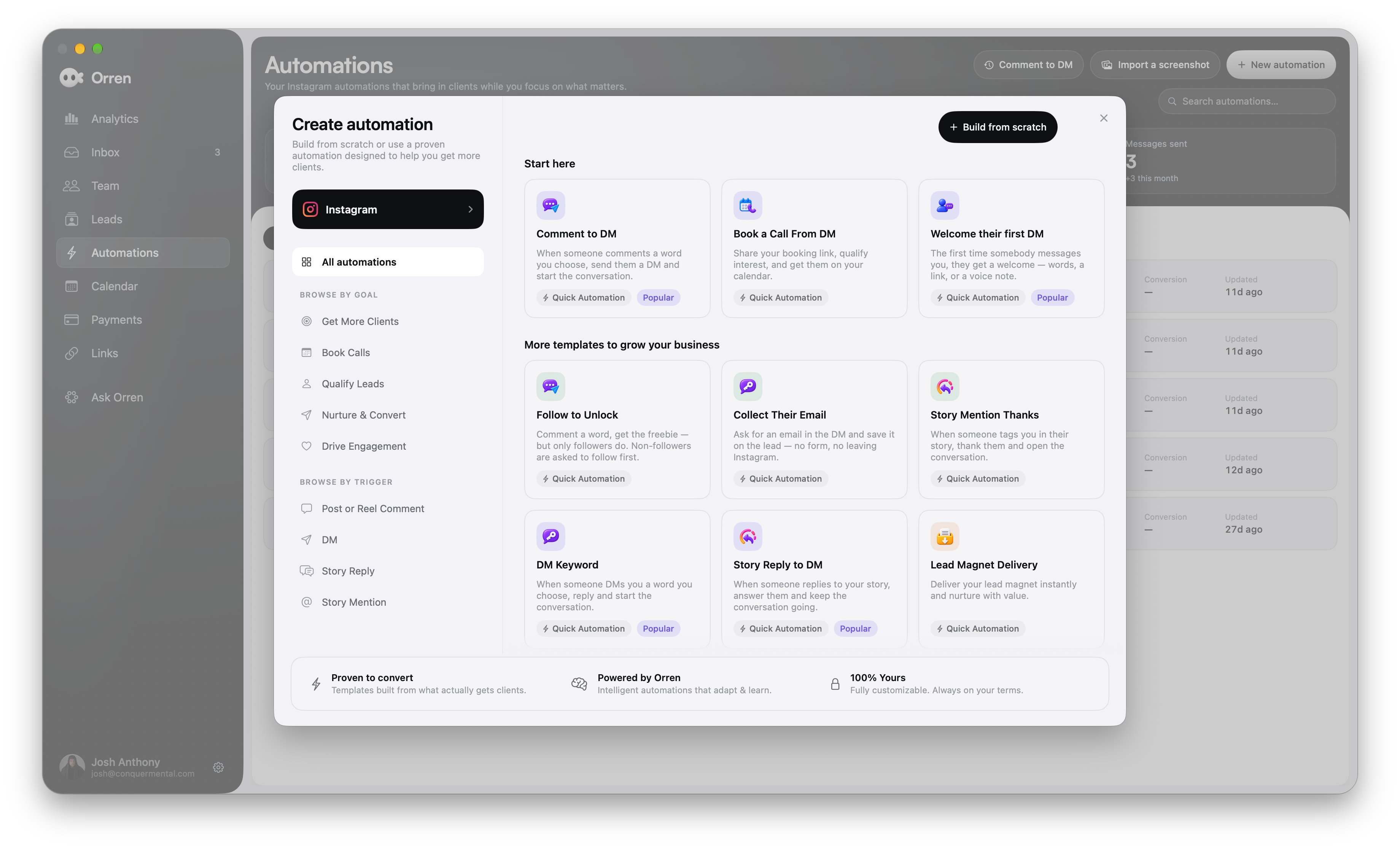
Start with a template. Make it your own.
You don’t need a blank canvas to get going. Choose a ready-made automation for the job, then customize the messages, resource and next steps for your business.
Actual Orren for Mac. Swipe across the library to explore the templates.
Choose what you want to do.
Start a conversation, share a resource, collect an email or help someone book a call. Pick the template that fits.
Match the way they reach you.
Browse by comments, DMs, story replies or story mentions. Start where the interest already is.
Give it your own next step.
Make the messages yours. Add your resource and decide whether Orren continues or your setter takes over.
The visual canvas
A simple sequence. Or a few more possibilities.
Start with a template and add your steps. When the conversation needs different paths, open the canvas and connect them.
Ask a question. Wait for a reply. Send a resource. Use a condition to decide which step comes next. See how the pieces fit before you go live.
⌘Built in Orren for Mac. Room to see the whole conversation.
Guide follow-upCanvas
Ask a question“Are you selling on your own or with a team?”
Check the answer ◇
On my own
↗Solo follow-up guideSend the relevant resource.
With a team
↗Team workflow guideA different answer. A different path.
An example of a condition with two paths.
You choose who takes it from here.
The automation opens the door. Configure what happens after it: Orren carries the conversation forward, or a setter steps in with the context.
Let Orren continue
The next reply. With your business behind it.
Let Orren handle the conversation using your business knowledge and the lead’s context. The first automated message becomes the start of a more useful exchange.
J Assigned to Jordan
NINA PATELAsked for the guide.Resource shared. Ready for a follow-up.
Hand off to your setter
A human picks up. The context comes along.
Route the conversation to your setter. The messages, lead details and shared resources stay together, so your team can pick up without starting from scratch.
You set the flow. You choose the handoff.
See what happened after “message sent.”
A reply is a beginning. Connect the flow to the lead’s journey and see what followed: a resource opened, a call booked or a recorded sale.
Review what ran, what was skipped and which flows reached the goals you set. Give your next automation something to learn from.
About Instagram automationsWhat can start an Instagram automation?
Start a flow from a comment keyword, a DM keyword, a story reply or a story mention. Choose the interaction that fits your post, resource or offer, then decide what happens next.
Can Orren handle the conversation after the automation?
Yes. Depending on how you configure the flow, Orren can continue handling the conversation using your business context, or hand it off to a setter. You choose how the conversation continues.
Do I have to build everything on a canvas?
No. Choose a ready-made template, such as Comment to DM, Book a Call From DM, Welcome their first DM or Lead Magnet Delivery. Customize it for your business. Open the canvas when you want to map conditions and different paths through the conversation.
Can I build automations on iPhone?
The automation builder and canvas are on Mac. You can manage existing automations on iPhone, but creating and editing flows happens in the Mac app.
No. Automations follow Instagram’s messaging permissions and reply windows. A comment can allow an opening private reply; the person needs to respond before the ongoing DM conversation can continue. Delays and scheduled steps do not bypass those limits.
Can I see what a flow actually did?
Yes. Review automation activity to see which rules ran, what they sent and when a run was skipped. With the relevant goal and tracking configured, you can also connect outcomes such as replies, booked calls and recorded payments to the flow.
Your cookie preferences.
We use optional Google Analytics cookies to understand how our website is used and make it better. You can accept or reject these cookies and change your choice anytime. Privacy policy
Your browser’s privacy signal is on. Optional analytics cookies stay off.


 Nina PatelGUIDE please!