
Make it recognizable.
Choose the image, title and description. Customize booking cards with your own logo and background.
Tracked links
Know who opened your video, guide or booking link. See who sent it, the calls booked and the sales that followed. Every resource stays connected to the lead.
 orrenGood conversations.
See how a lead moves from first reply to booked call.
 Maya ChenThe next steps, connected.
Illustrated example of a tracked link and the activity that follows.
You’ve sent the case study. Now you want to know whether they opened it before you follow up.
Orren creates a unique tracked link for each lead you send it to. See who clicked, when they clicked and who shared it. The activity stays with their conversation.
The same resource. A clear record for each person.
Example lead activity. Each send has its own tracked URL.
Create a link once on Mac. Your team can find it in the composer on Mac or iPhone, choose the resource and send a personal tracked link. No hunting through folders. No copying from another chat.
Can you show me how it would work for my team?
Illustrated composer. Choose the resource, then send.
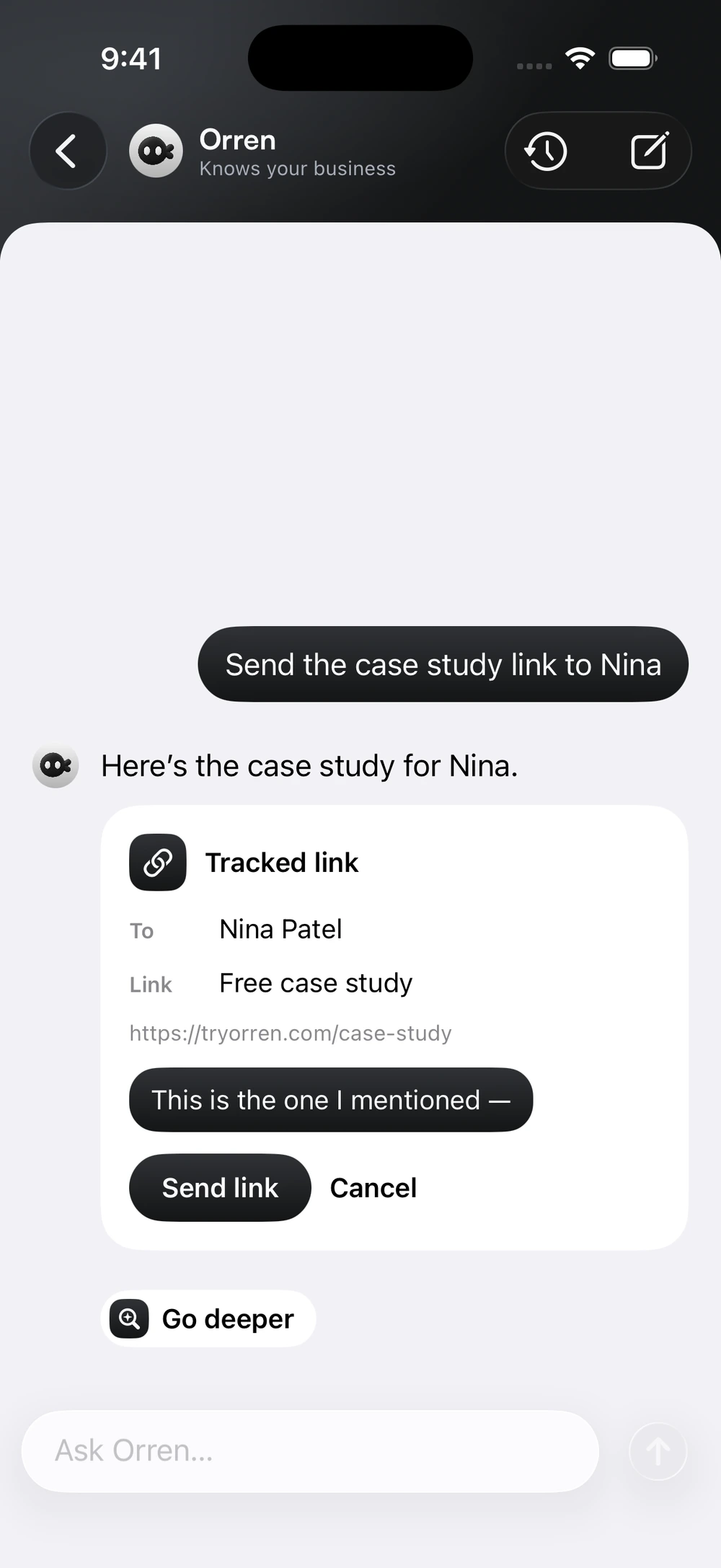
Or ask Orren on iPhone.
Review the resource before you send.
A useful link deserves a useful preview. Add your thumbnail, title and description so the person receiving it knows why it’s worth opening.
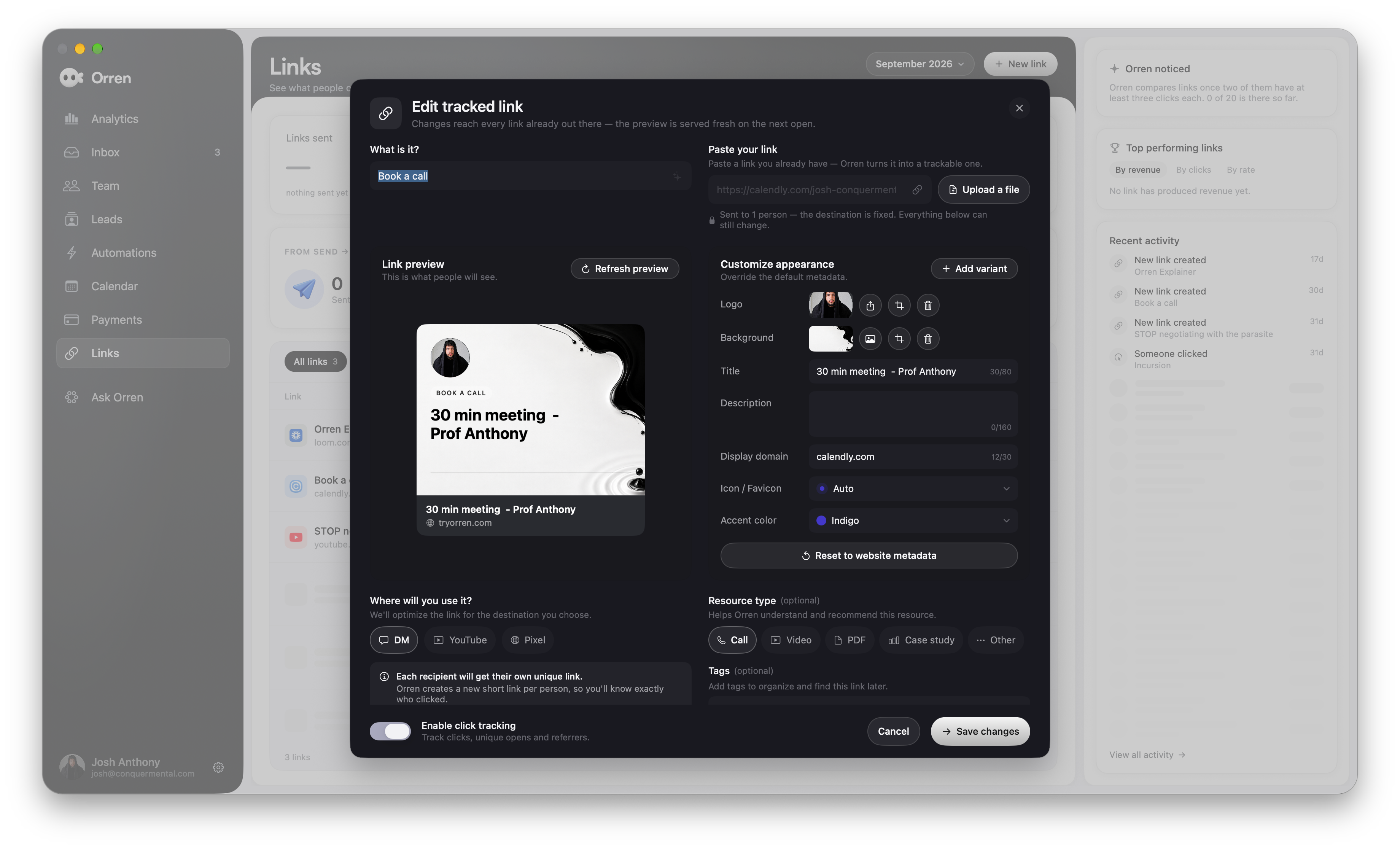
Actual Orren for Mac. Swipe across the editor to see the details.
Choose the image, title and description. Customize booking cards with your own logo and background.
Name the resource and choose its type so your team can find the right video, guide or booking page.
Add a preview variant on Mac, then compare how your DM links perform.
Instagram controls the final appearance of link previews.
Thumbnail testing
Test different thumbnails on your DM links. Compare clicks, then look further: the calls booked and recorded revenue after those sends.
orrenGood conversations.See how a lead moves from first reply to booked call.
Fewer clicks. More recorded revenue.
orrenGood conversations.See how a lead moves from first reply to booked call.
More clicks. A different outcome.
Illustrative comparison, not customer results. Testing uses individual DM links. Calls and revenue require recorded outcome data.
A click is useful. Knowing what happened next is better.
Follow a lead from the resource your setter sent to the call they booked and the payment recorded afterward. See which teammates shared it and how those leads progressed.
Bring booking and payment activity into Orren to put those outcomes beside the link activity.
See the full team pictureExample data. Connected outcomes show the journey; a click alone does not prove what caused a sale.
Orren Pixel
Add Orren Pixel to a website you control. Bring page visits, form submissions and configured conversion events back into the picture, connected to the lead when they can be identified.

Resource page visitedPage view received
Application submittedSupported form submission
Purchase event receivedConfigured on your website
Add the pixel to the landing pages and resource pages you control. You don’t need a pixel to track the initial link click.
Record supported form submissions. Configure purchases or custom milestones for the actions your site should report.
A click means the link was opened. It doesn’t automatically mean a video was watched or a sale was made.
Every feature included. 7-day trial. Card required.
A few things worth knowing
Personal links, resource previews and the details behind the activity.
Something more specific?
Ask us directlyUse a link to a resource you already have, such as a YouTube video, case study, guide, landing page or booking page. Create the resource in Orren on Mac, give it a recognizable name and customize its preview. Connected YouTube content can supply video details; other links can use available website metadata.
Yes. When you choose a resource from the conversation composer, Orren creates a personal tracked URL tied to that lead and conversation. The send also records the teammate who shared it. Your team can reuse the same resource without manually creating tracking links.
Yes. Resources created on Mac are available in the shared link picker on iPhone. Pick the resource from the conversation composer, then send it. Link creation, preview editing and thumbnail testing are managed on Mac.
Yes. For links sent in DMs, create preview variants and compare sends, clicks, later booked calls and recorded revenue. Each recipient’s link keeps its assigned preview. A/B testing is for individual DM sends, not one public link reused everywhere. Instagram controls how its previews render and cache, so the displayed card may vary.
Orren connects link activity to the lead, then shows recorded calls and payments that follow the click. Team reporting identifies who sent the resource. Those results need the relevant booking and payment data connected or recorded in Orren. They show the journey around a sale, rather than proving that one link alone caused it.
Install the Orren Pixel on a website you control to bring page visits and supported form submissions into the picture. Purchase and other custom events need to be connected to the actions on your site. When a visit can be matched to a tracked lead, that activity adds context to their journey. Your site’s privacy disclosures and consent settings should cover the tracking you enable.
No. A tracked click tells you they opened the link. It does not, by itself, tell you how long they watched a video on YouTube. Deeper activity requires supported tracking on a page you control.
We use optional Google Analytics cookies to understand how our website is used and make it better. You can accept or reject these cookies and change your choice anytime. Privacy policy
Your browser’s privacy signal is on. Optional analytics cookies stay off.