
Lead intelligence
Understand every lead.
Before you reply.
Their needs, buying signals and history, together in one profile. Orren turns your Instagram conversations into context your whole team can use.

 Budget confirmed Another moment in the story
 Opened the case study
 A profile. A history. A clearer next move.
There’s a person
behind that message.
A reply tells you what someone said. Their profile helps you understand what they need.
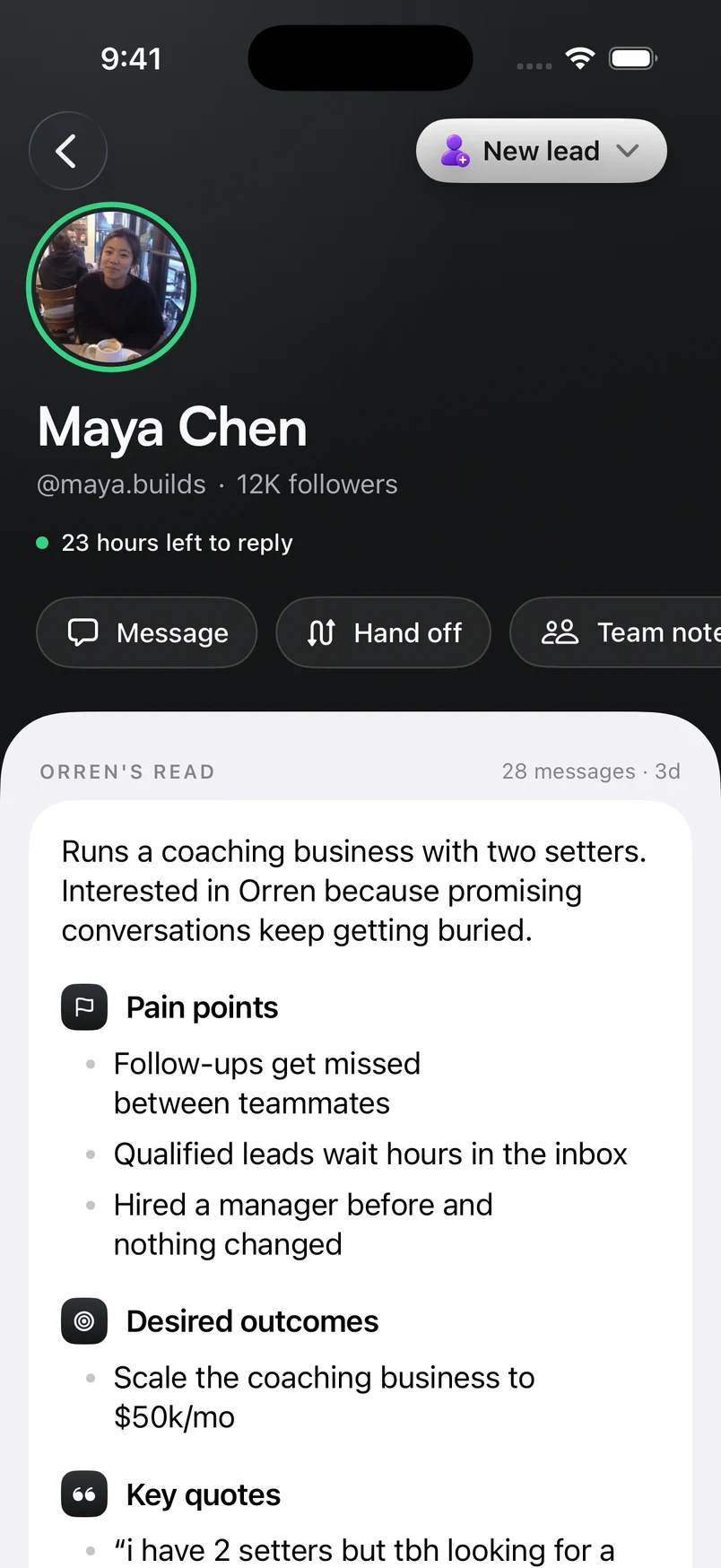
Orren pulls the conversation together into a clear summary, with pain points, desired outcomes and key quotes. Pick up the context without reading the entire thread again.
Connected to your inbox
 New lead
Runs a coaching business with two setters. Promising conversations keep getting buried.
Follow-ups get missed between teammates.
A clearer system for her team to keep up.

Suggested next stepA walkthrough with her team.
An enlarged look at an example lead.
Buying signals.
Right on the profile.
Budget. Interest. An objection to work through. Orren reads the conversation and adds tags that make those details easier to spot.
Maya Chen“The budget works. I just need to see how my setters would use it.”
One message. More context for the next reply.
Budget confirmedSignals stay with the lead.
A stage tells you where they are.
Tags explain what is happening in the conversation. See both together, so a label comes with context.
The same signals in your inbox.
Use tags to filter conversations and bring the leads that need attention back into view.
Illustrative conversation and tags.
See how the lead
got here.
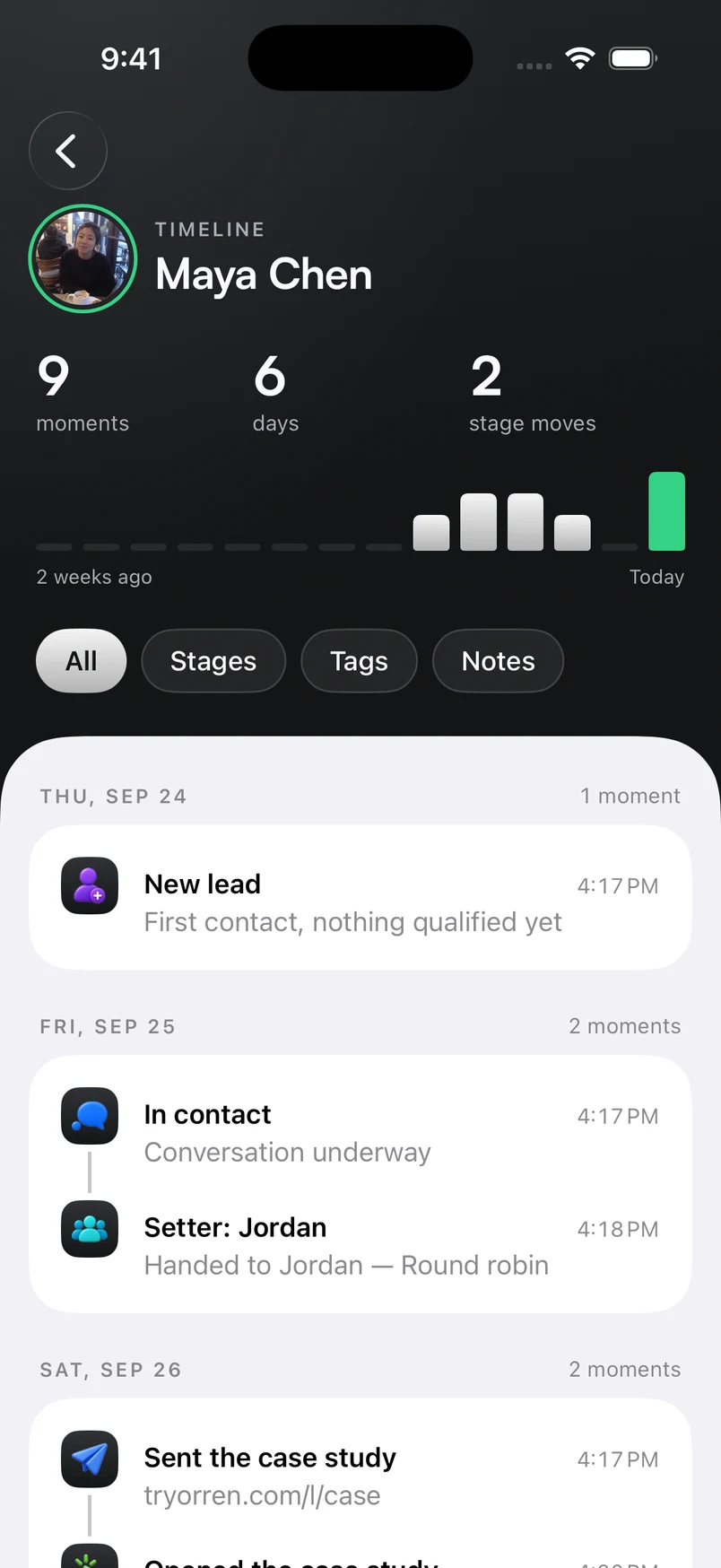
Every recorded step adds context. Follow stage changes, assignments, notes and tracked links in a timeline that belongs to the person.
The conversation begins
Maya arrives as a new lead.

Jordan takes the lead
The setter assignment joins her history.

A resource is sent
The case study is connected to Maya.
She opens the case study
A tracked click adds another signal of interest.
One lead’s example journey, from first contact to a resource opened.
A handoff.
Without the catch-up.
See which setter and closer are working with a lead. Keep team notes beside the profile, and check the history before someone else takes over.
The next conversation starts with what your team already knows.
Maya’s teamSetterJordan
CloserAlex

Show Maya how the team shares follow-ups during the walkthrough.
Example team assignment and note.
Go into the next reply
knowing more.
Every feature included. Start with a 7-day trial. Card required.
A few things worth knowing
Good questions.
Clear answers.
Profiles, tags and the history behind each conversation. Here’s how it fits together.
Something more specific?
Ask us directlyWhat is in a lead’s profile?
Their Instagram identity, stage, tags, assigned setter and closer, team notes, and contact details where available. Orren’s read brings together the conversation summary, pain points, desired outcomes, key quotes and a suggested next step.
Where do the tags come from?
Orren reads conversations for signals such as budget and interest, then applies relevant tags. Those tags stay with the lead, so you can understand the person in their profile and find similar conversations in your inbox.
What does the timeline show?
The timeline brings recorded activity into chronological order, including stage changes, assignments, notes, tags, and tracked links sent or opened. You can filter by stages, tags or notes to focus on the part of the history you need.
Can my team pick up the same lead?
The profile shows the assigned setter and closer, with team notes and a handoff action. The next teammate can check the context and recorded history before continuing the conversation.
Is Orren’s interpretation always right?
AI can miss context. Use the summary and tags to get oriented, and check the original conversation when a detail matters. Your team stays responsible for the next step.
Can I use lead intelligence on iPhone?
Yes. The screens on this page show the iPhone experience, including the lead profile and timeline. Orren for iPhone is currently distributed through TestFlight; visit the iPhone page for access and installation details.